첨부파일 다운로드
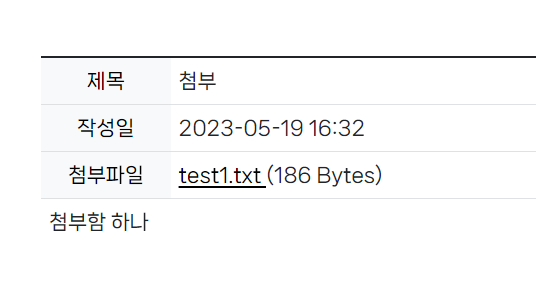
첨부파일 이름에 a태그를 달아주고 주소와 함께 파일 번호(pk)를 파라미터로 넘겨준다.
notice_detail.html
<div th:if="${#lists.size(notice.boardFileList) == 0}">
	첨부된 파일이 없습니다.
</div>
<div th:unless="${#lists.size(notice.boardFileList) == 0}"
			th:each="file : ${notice.boardFileList}">
	<a th:href="@{/notice/download(fileNum=${file.fileNum})}" style="color: black; text-decoration:underline; text-underline-offset : 5px;">
	[[${file.originFileName}]]
	</a>
	 ([[${file.fileSize}]])
</div>
NoticeController.java
//첨부파일 다운로드
@GetMapping("/download")
public void fileDownload(String fileNum, HttpServletResponse response) {
    //HttpServletResponse response 객체에 파일 정보를 담아 프론트단으로 전송

    //넘겨받은 fileNum으로 파일 정보(원본 파일명, 첨부된 파일명) 조회
    BoardFileVO downloadFile =  noticeService.getDownloadFileVO(fileNum);
    String attachedFileName = downloadFile.getAttachedFileName();
    String originFileName =  downloadFile.getOriginFileName();

    try {
        File file = new File(ConstVariable.BOARD_UPLOAD_PATH + attachedFileName);

        //File 객체의 toPath 메소드는 Path 객체를 반환
        //Files.readAllBytes() 메서드는 파일 경로를 가져와  바이트 배열로 반환
        byte[] fileByte = Files.readAllBytes(file.toPath());

        //HTTP Header 설정

        //파일 유형 설정
        response.setContentType("application/octet-stream");
        //파일 길이 설정
  	response.setContentLength(fileByte.length);

        //데이터 형식 설정
        response.setHeader("Content-Disposition",
            "attachment; fileName=\\"" + URLEncoder.encode(originFileName, "UTF-8") + "\\";");
        //인코딩 방식 설정
        response.setHeader("Content-Transfer-Encoding", "binary");

        //버퍼의 출력 스트림을 출력
        response.getOutputStream().write(fileByte);
        //버퍼에 남아있는 출력 스트림을 출력
        response.getOutputStream().flush();
        //출력 스트림 닫음
        response.getOutputStream().close();
    }
    catch (IOException e) {
        e.printStackTrace();
    }
}'프로젝트' 카테고리의 다른 글
| 14. 공지사항 게시판 (첨부파일 삭제, 글 목록에 첨부파일 아이콘) (0) | 2023.05.22 |
|---|---|
| 13. 공지사항 게시판 (첨부파일 수정) (0) | 2023.05.22 |
| 11. 공지사항 게시판 (유효성 검사, 파일 업로드) (0) | 2023.05.20 |
| 10. 공지사항 게시판 (삭제, 수정) (0) | 2023.05.18 |
| 9. 공지사항 게시판 (이전글, 다음글 보기) (0) | 2023.05.18 |