댓글 삭제

삭제 버튼을 누르면 onclick 속성으로 deleteReply() 함수가 실행된다.
notice_detail.js
//댓글 삭제
function deleteReply(replyNum, deleteBtn) {
	const deleteReplyTag = deleteBtn.closest('tr');
	const replyTable = document.querySelector('#replyTable');
	const replyCntSpan = document.querySelector('#replyCntSpan');

	if(confirm('댓글을 삭제하시겠습니까?')) {
		//ajax start
		$.ajax({
			url: '/reply/delete', //요청경로
			type: 'post',
			async: true,
			contentType: 'application/x-www-form-urlencoded; charset=UTF-8',
			data: {'replyNum' : replyNum}, //필요한 데이터
			success: function(result) {
				deleteReplyTag.remove();

				const replyTrs = replyTable.querySelectorAll('tr');

				//댓글이 없으면
				if(replyTrs.length == 1) {
					let str = '';

					str += `<tr class="border-top" id="noReplyTr">                                             `;
					str += `	<td class="text-secondary text-center align-middle" colspan="2" height="120px">`;
					str += `		등록된 댓글이 없습니다.                                                    		`;
					str += `	</td>                                                                          `;
					str += `</tr>                                                                              `;

					replyTable.insertAdjacentHTML('afterbegin', str);
				}

				replyCntSpan.textContent = Number(replyCntSpan.textContent) - 1;
			},
			error: function() {
				alert('실패');
			}
		});
		//ajax end
	}
}
Ajax를 이용해 Controller로 댓글 번호 pk를 넘겨준다.
비동기 방식이기 때문에 페이지 리로딩 없이 처리가 가능하다.
컨트롤러에서 삭제를 성공했을 때, 삭제한 댓글이 담긴 tr 태그를 삭제해준다.
댓글 테이블에서 tr태그를 모두 select 해 왔을 때, tr태그가 하나인 경우(= 댓글 등록 tr만 남았을 경우, 등록된 댓글이 하나도 없을 경우) 등록된 댓글이 없다는 내용을 담고 있는 tr 태그를 삽입해준다.
댓글 수를 나타내는 span 태그도 가져와서 -1 해줌
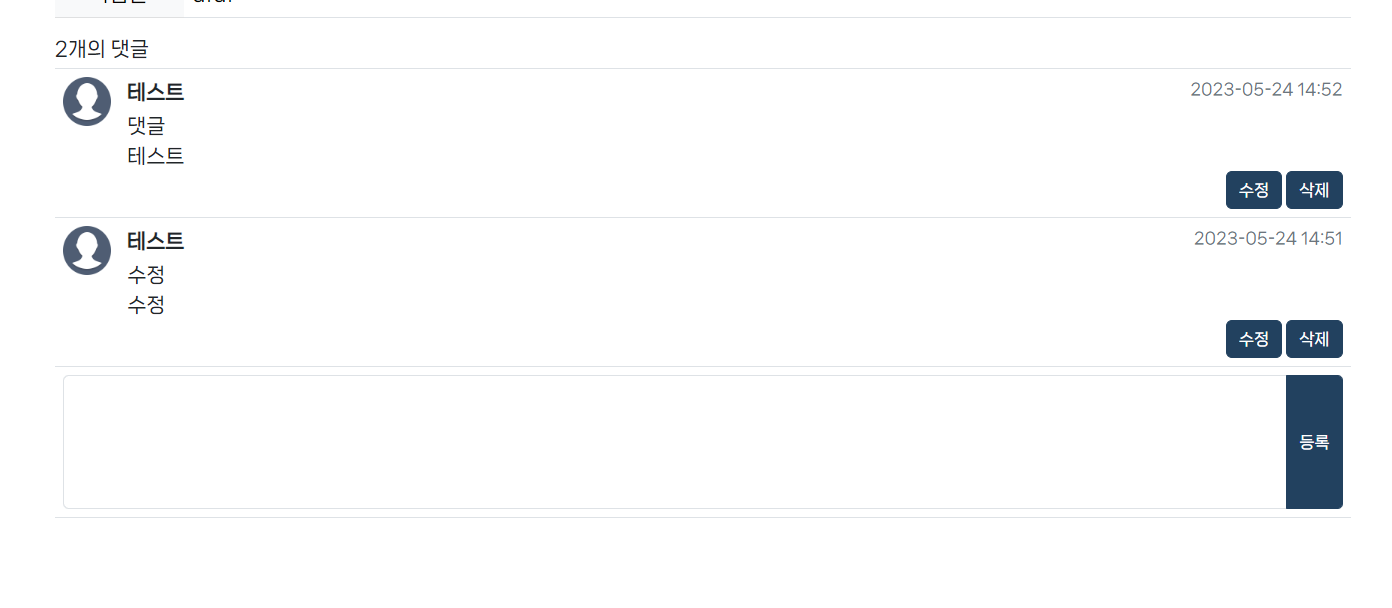
처음 사진에서 마지막 댓글 삭제 후, 페이지 리로드 없이도 댓글이 사라지고 댓글 개수도 2개로 줄어든 것을 볼 수 있다.
댓글 수정
댓글 수정은 삭제보다 훨씬 까다롭다.
먼저 수정 버튼을 눌렀을 때, updateReplyForm()함수가 실행된다.
댓글 내용이 있던 부분에 기존 내용이 담겨있는 textarea로 변경해준다.
‘수정’ 이라고 쓰여있던 버튼을 ‘등록’으로 바꾸고, onclick 함수도 updateReply()로 바꾼다.
이때 innerHTML로 기존 내용을 가져와야 <br>태그까지 가져올 수 있고, 그 <br>태그는 정규식을 이용해 엔터값으로 변경하여 textarea에 담아준다.

notice_detail.js
//댓글 수정 폼
function updateReplyForm(replyNum, updateBtn) {
	const replyContentDiv = updateBtn.parentElement.previousElementSibling;
	const replyContent = replyContentDiv.innerHTML;

	const replyContentBr = replyContent.replaceAll("<br>", "\\r\\n");

	const str = `<textarea class="form-control my-1" style="resize: none">${replyContentBr}</textarea>`;

	replyContentDiv.replaceChildren();
	replyContentDiv.insertAdjacentHTML('afterbegin', str);

	updateBtn.value = '등록';
	updateBtn.setAttribute("onClick", `updateReply("${replyNum}", this)`);
}
댓글 내용 수정 후 등록 버튼을 눌렀을 때, updateReply() 함수가 실행된다.
내용이 입력되지 않았을 때, 간단한 유효성 검사를 해주고, 정규식을 이용해 엔터값이 있는 경우 <br>태그로 바꿔준다.
notice_detail.js
//댓글 수정
function updateReply(replyNum, formBtn) {
	const replyContentDiv = formBtn.parentElement.previousElementSibling;
	const replyContent = replyContentDiv.querySelector('textarea').value;
	const replyDateDiv = replyContentDiv.previousElementSibling.lastElementChild;

	if(replyContent == '' || replyContent == null) {
		alert('댓글을 입력해주세요.');
		return false;
	};

	const replyContentBr = replyContent.replace(/(?:\\r\\n|\\r|\\n)/g, '<br>');

	//ajax start
	$.ajax({
		url: '/reply/update', //요청경로
		type: 'post',
		async: true,
		contentType: 'application/x-www-form-urlencoded; charset=UTF-8',
		data: {'replyNum' : replyNum, 'replyContent' : replyContentBr}, //필요한 데이터
		success: function(result) {
			const reply = result;

			replyDateDiv.replaceChildren();
			replyDateDiv.textContent = reply.replyDate;

			replyContentDiv.replaceChildren();
			replyContentDiv.innerHTML = reply.replyContent;

			formBtn.value = '수정';
			formBtn.setAttribute("onClick", `updateReplyForm("${replyNum}", this)`);
		},
		error: function() {
			alert('실패');
		}
	});
	//ajax end
}
엔터값 처리를 해준 댓글 내용과 댓글 번호 pk값을 컨트롤러로 보내주면, 컨트롤러에서는 update쿼리로 수정하고 수정된 댓글을 조회한 값을 반환해준다.
수정된 댓글 정보를 기존 댓글 칸에 넣어준다. 이때 innerHTML로 넣어 줘야 <br>태그도 인식이 된다.
‘등록’이라고 적혀있던 버튼을 ‘수정’으로 바꿔주고 onclick함수도 updateReplyForm()으로 바꿔준다.
ReplyController.java
//댓글 수정
	@ResponseBody
	@PostMapping("/update")
	public ReplyVO updateReply(ReplyVO replyVO) {
		replyService.updateReply(replyVO);

		return replyService.getReplyByReplyNum(replyVO.getReplyNum());
	}
게시글 상세 조회 시 댓글 목록 조회
board-mapper.xml
<!-- (상세 조회) + 댓글 리스트 조회 -->
<select id="getReplyList" resultMap="replyMapper.reply">
    SELECT REPLY_NUM
        , REPLY_WRITER
        , ENAME
        , REPLY_CONTENT
        , TO_CHAR(REPLY_DATE, 'YYYY-MM-DD HH24:MI') REPLY_DATE
    FROM BOARD_REPLY, EMP
    WHERE BOARD_NUM = #{boardNum}
    AND REPLY_WRITER = EMPNO
    ORDER BY REPLY_NUM
</select>
하나의 글을 상세 조회할 때 ‘조회수 증가 & 첨부파일 조회 + 댓글 조회 + 글 상세 조회’를 트랜잭션 처리했다.
NoticeServiceImpl.java
//공지글 상세 조회
@Override
@Transactional(rollbackFor = Exception.class)
public BoardVO getNoticeDetail(BoardVO boardVO) {
    //조회수 증가
    sqlSession.update("boardMapper.updateBoardView", boardVO);

    //첨부파일 조회
    List<BoardFileVO> selectedFileList = sqlSession.selectList("boardMapper.getBoardFile", boardVO);

    //댓글 조회
    List<ReplyVO> replyList = sqlSession.selectList("boardMapper.getReplyList", boardVO);

    //상세 조회하는 글
    BoardVO selectedBoard = sqlSession.selectOne("boardMapper.getNoticeDetail", boardVO);

    //첨부파일 변수에 담아줌
    selectedBoard.setBoardFileList(selectedFileList);

    //댓글 변수에 담아줌
    selectedBoard.setReplyList(replyList);

    //글 상세 조회 정보 반환
    return selectedBoard;
}
글 목록 조회 시 댓글 개수
첨부파일 개수 조회처럼 각 게시물마다 댓글 개수를 조회해서 댓글이 있는 글에만 제목 옆에 개수가 나타나도록 했다.
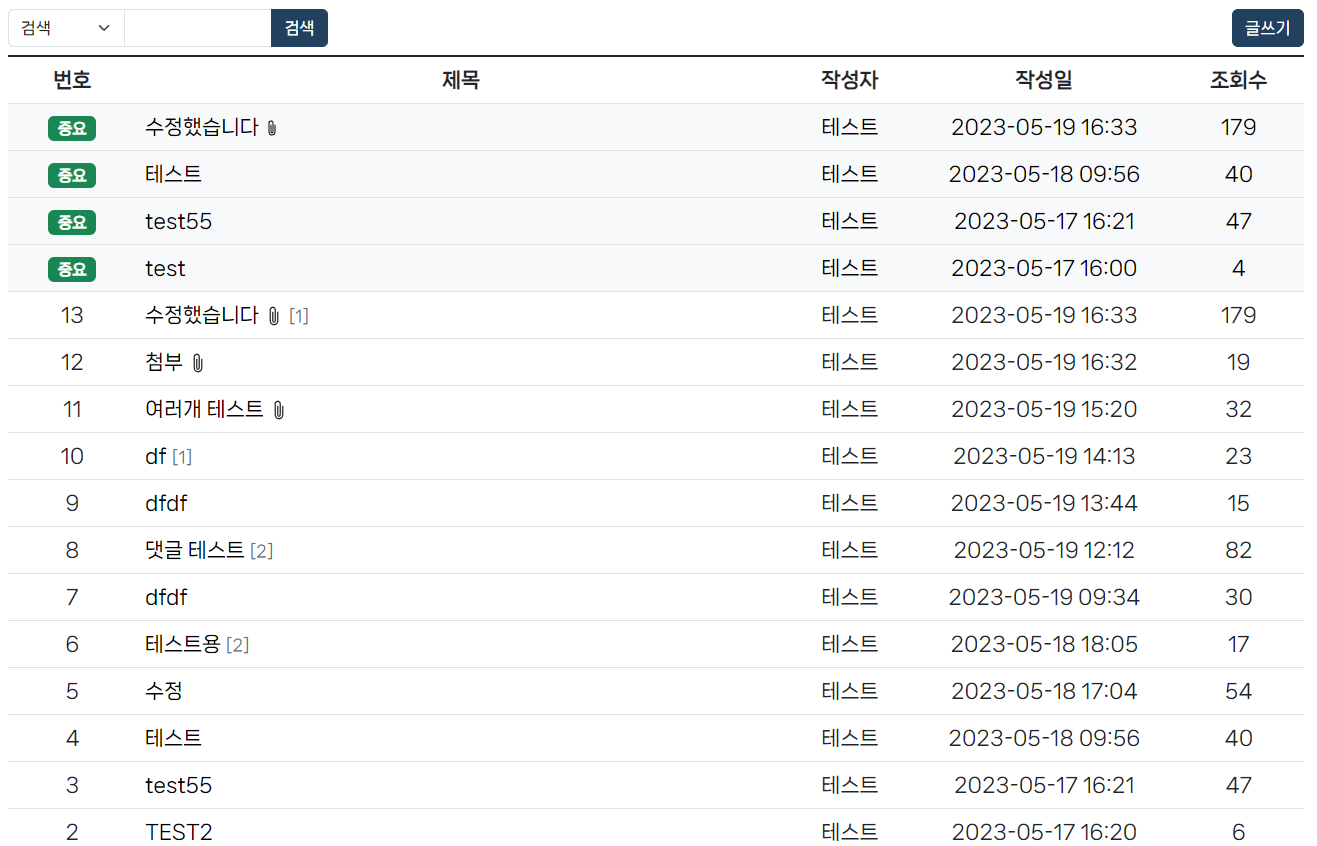
(+ 이제 검색 기능이랑 페이징 처리만 하면 공지사항 게시판은 어느 정도.. 끝..)
'프로젝트' 카테고리의 다른 글
| 18. 공지사항 게시판 (페이징 처리) (0) | 2023.05.30 |
|---|---|
| 17. 공지사항 게시판 (검색) (0) | 2023.05.30 |
| 15. 공지사항 게시판 (댓글 등록) (0) | 2023.05.26 |
| 14. 공지사항 게시판 (첨부파일 삭제, 글 목록에 첨부파일 아이콘) (0) | 2023.05.22 |
| 13. 공지사항 게시판 (첨부파일 수정) (0) | 2023.05.22 |