+) 댓글 테이블에 댓글 작성자 컬럼 추가함 (까먹음..)
댓글 작성자 컬럼은 사원 테이블의 사원 번호 컬럼을 참조하는 외래키임.
ALTER TABLE BOARD_REPLY ADD REPLY_WRITER NUMBER CONSTRAINT REPLY_EMP_FK REFERENCES EMP(EMPNO) NOT NULL;댓글 등록
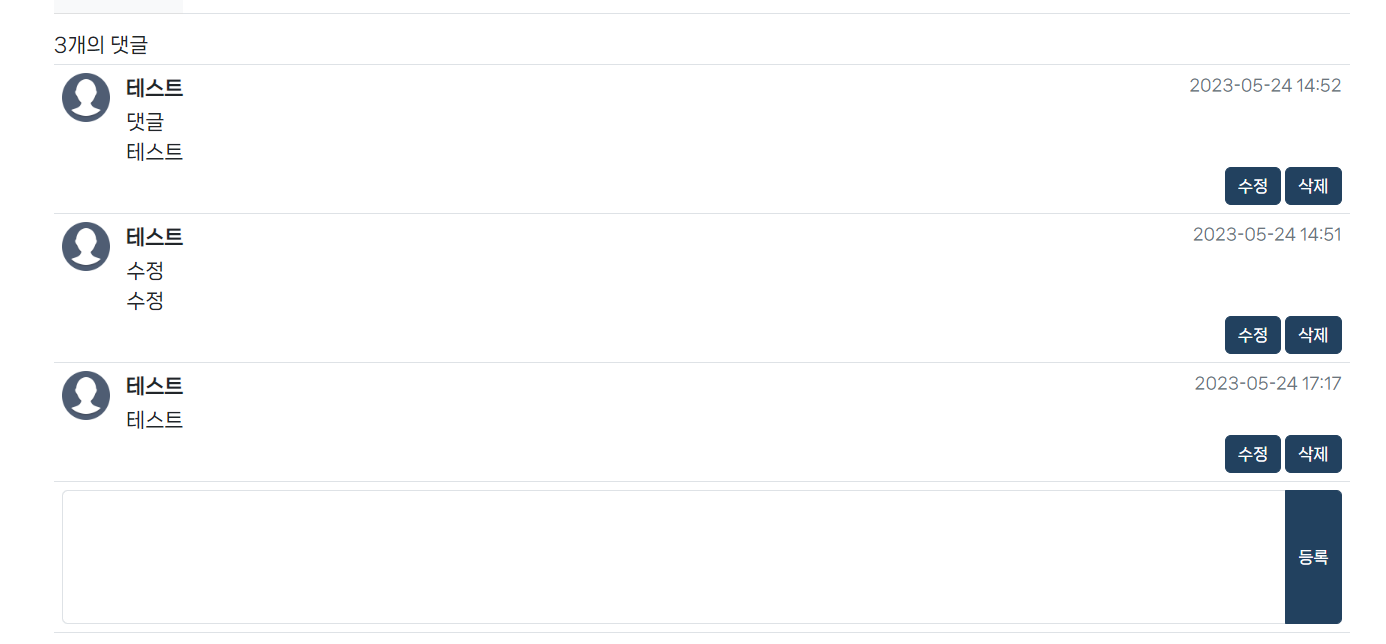
글 상세 조회 페이지 하단에 댓글 테이블을 만들었다.
제일 하단에 댓글 입력 칸이 있고 시간순으로 위에서 아래로 댓글이 등록되도록 했음
(댓글 입력 칸)
등록 버튼을 클릭하면 regReply() 함수가 실행됨
notice_detail.html
<tr class="border-top" id="regReplyTr">
	<td colspan="2">
		<div class="input-group">
			<textarea class="form-control" rows="5px" style="resize: none" id="replyTextarea"></textarea>
			<input type="button" class="btn" th:onclick="regReply([[${notice.boardNum}]]);" value="등록">
		</div>
	</td>
</tr>
regReply() 함수
댓글 기능은 전체적으로 Ajax로 구현했는데, 페이지 리로딩 없이 비동기식으로 처리할 수 있기 때문이다.
notice_detail.js
//댓글 등록
function regReply(boardNum) {
	const replyTextarea = document.querySelector('#replyTextarea');
	const replyContent = replyTextarea.value;
	const regReplyTr = document.querySelector('#regReplyTr');
	const noReplyTr = document.querySelector('#noReplyTr');
	const replyCntSpan = document.querySelector('#replyCntSpan');

	if(replyContent == '' || replyContent == null) {
		alert('댓글을 입력해주세요.');
		return false;
	};

	const replyContentBr = replyContent.replace(/(?:\\r\\n|\\r|\\n)/g, '<br>');

	//ajax start
	$.ajax({
		url: '/reply/regReply', //요청경로
		type: 'post',
		async: true,
		contentType: 'application/x-www-form-urlencoded; charset=UTF-8',
		data: {'replyContent' : replyContentBr, 'boardNum' : boardNum}, //필요한 데이터
		success: function(result) {
			const reply = result;

			if(noReplyTr != null) {
				noReplyTr.remove();
			}

			let str = '';

			str += `<tr class="border-top">                                                         `;
			str += `	<td class="text-center">                                                    `;
			str += `		<img src="/img/content/board/testProfile.png" width="100%" class="mx-0">`;
			str += `	</td>                                                                       `;
			str += `	<td>                                                                        `;
			str += `		<div class="d-flex justify-content-between">                            `;
			str += `			<div class="fw-semibold mb-1">${reply.ename}</div>                    `;
			str += `			<div class="text-secondary fs-6">${reply.replyDate}</div>           `;
			str += `		</div>                                                                  `;
			str += `		<div>${reply.replyContent}</div>                                              `;
			str += `		<div class="d-grid gap-1 d-md-flex justify-content-md-end">             `;
			str += `			<input type="button" class="btn" onclick="updateReplyForm('${reply.replyNum}', this)" value="수정">                      `;
			str += `			<input type="button" class="btn" onclick="deleteReply('${reply.replyNum}', this)" value="삭제">                      `;
			str += `		</div>                                                                  `;
			str += `	</td>                                                                       `;
			str += `</tr>                                                                           `;


			regReplyTr.insertAdjacentHTML('beforebegin', str);

			replyTextarea.value = '';

			replyCntSpan.textContent = Number(replyCntSpan.textContent) + 1;
		},
		error: function() {
			alert('실패');
		}
	});
	//ajax end

}
textarea value 값이 비어 있을 때 간단한 유효성 검사와 정규식을 사용해 엔터값이 넘어 왔을 때 <br> 태그로 바꿔 주었다.
댓글 등록은 리소스 생성이기 때문에 POST 방식을 사용한다.
댓글 내용 값(replyContent)과 댓글을 등록하는 글의 번호(boardNum)를 넘겨준다.

noReplyTr은 위 사진처럼 댓글이 없을 때 보이는 tr태그이다.
지금 등록하는 댓글이 해당 글의 첫 댓글이라면 (=noReplyTr이 존재한다면) 그 tr을 삭제함
컨트롤러의 리턴 값이 새로 등록한 댓글을 ReplyVO이기 때문에 받아온 값으로 바로 댓글 테이블에 등록한 댓글 정보를 추가함
댓글 테이블 상단에 현재 글의 댓글 수가 몇개인지가 나타나 있는데 , 해당 span태그도 가져와서 1을 더해준 값으로 바꿔준다.
++) 아직 로그인 처리를 안 해서 댓글을 쓴 사람의 이미지, 이름 들고오는 작업도 해야 함
ReplyController.java
//댓글 등록
@ResponseBody
@PostMapping("/regReply")
public ReplyVO regReplyAjax(ReplyVO replyVO) {
    //다음으로 들어갈 댓글 번호 조회
    String nextReplyNum = replyService.getNextReplyNum();
    //댓글 번호 세팅
    replyVO.setReplyNum(nextReplyNum);

    //댓글 등록
    replyService.regReply(replyVO);

    return replyService.getReplyByReplyNum(nextReplyNum);
}
등록한 댓글을 바로 조회해서 반환해 주기 위해서(Ajax에서 받은 반환값으로 화면에 바로 댓글을 띄워줘야 하기 때문) 댓글 번호 조회를 따로 만듦
댓글 테이블 html
notice_detail.html
<div class="row">
	<div class="col-12 mb-1">
		<span id="replyCntSpan">[[${notice.replyCnt}]]</span>개의 댓글
	</div>
	<div class="col-12">
		<table class="table table-borderless border-top border-bottom" id="replyTable">
			<colgroup>
				<col width="5%">
				<col width="*">
			</colgroup>

			<th:block th:if="${#lists.size(notice.replyList) == 0}">
				<tr class="border-top" id="noReplyTr">
					<td class="text-secondary text-center align-middle" colspan="2" height="120px">
						등록된 댓글이 없습니다.
					</td>
				</tr>
			</th:block>
			<th:block th:if="${#lists.size(notice.replyList) != 0}"
						th:each="reply : ${notice.replyList}">
				<tr class="border-top">
					<td class="text-center">
						<img src="/img/content/board/testProfile.png" width="100%" class="mx-0">
					</td>
					<td>
						<div class="d-flex justify-content-between">
							<div class="fw-semibold mb-1">[[${reply.ename}]]</div>
							<div class="text-secondary fs-6">[[${reply.replyDate}]]</div>
						</div>
						<div th:utext="${reply.replyContent}"></div>
						<div class="d-grid gap-1 d-md-flex justify-content-md-end">
							<input type="button" class="btn" th:onclick="updateReplyForm([[${reply.replyNum}]], this)" value="수정">
							<input type="button" class="btn" th:onclick="deleteReply([[${reply.replyNum}]], this)" value="삭제">
						</div>
					</td>
				</tr>
			</th:block>

			<tr class="border-top" id="regReplyTr">
				<td colspan="2">
					<div class="input-group">
						<textarea class="form-control" rows="5px" style="resize: none" id="replyTextarea"></textarea>
						<input type="button" class="btn" th:onclick="regReply([[${notice.boardNum}]]);" value="등록">
					</div>
				</td>
			</tr>
		</table>
	</div>
</div>
'프로젝트' 카테고리의 다른 글
| 17. 공지사항 게시판 (검색) (0) | 2023.05.30 |
|---|---|
| 16. 공지사항 게시판 (댓글 삭제, 수정) (0) | 2023.05.26 |
| 14. 공지사항 게시판 (첨부파일 삭제, 글 목록에 첨부파일 아이콘) (0) | 2023.05.22 |
| 13. 공지사항 게시판 (첨부파일 수정) (0) | 2023.05.22 |
| 12. 공지사항 게시판 (첨부파일 다운로드) (0) | 2023.05.22 |